00
days
00
hrs
00
min
00
sec
Guides
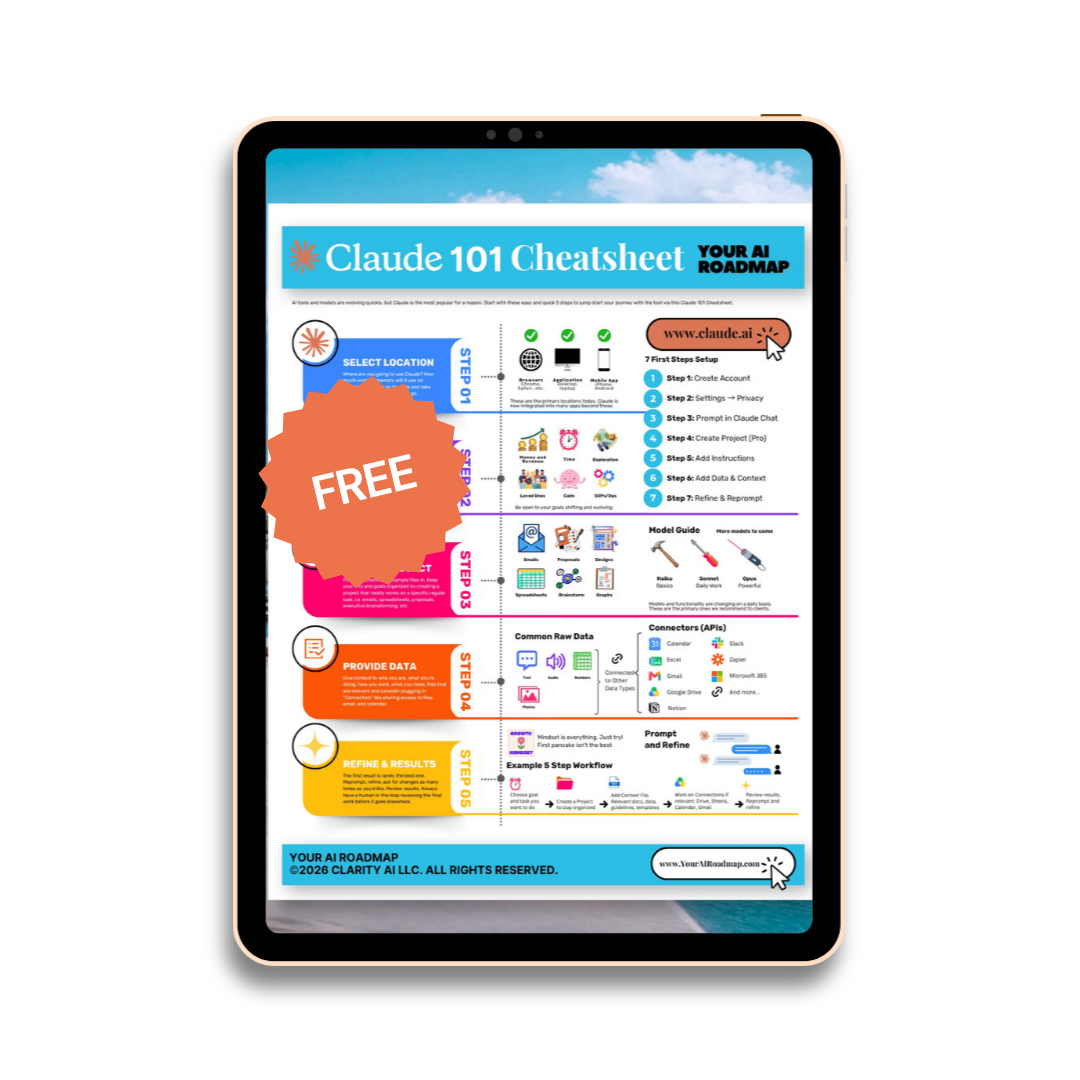
Claude 101 Cheatsheet
How CEOs and senior leaders can use more of Claude: platforms, models, setup, Projects, context files, Memory, Skills, Connectors, and the workflows worth building first.
Most executives use a fraction of Claude. They ask one question, get one answer, and close the tab. Then they conclude AI is fine for interns and not for the C-suite.
The problem is not the model. It is the setup.
Claude becomes an executive tool when it is configured as a system: a workspace for board updates, investor materials, commercial strategy, meeting prep, and the twenty drafts a week that currently sit in your head or in your assistant's inbox.
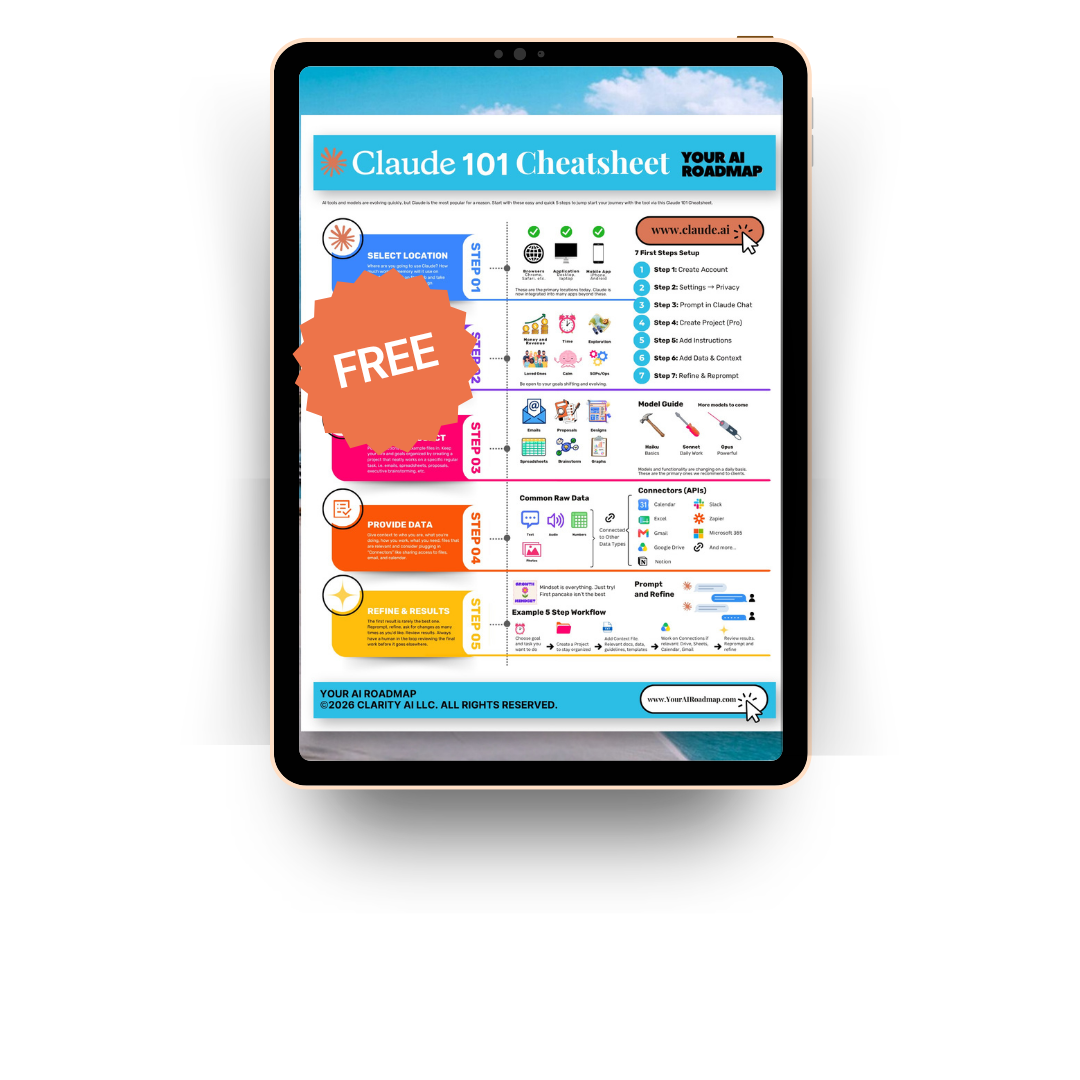
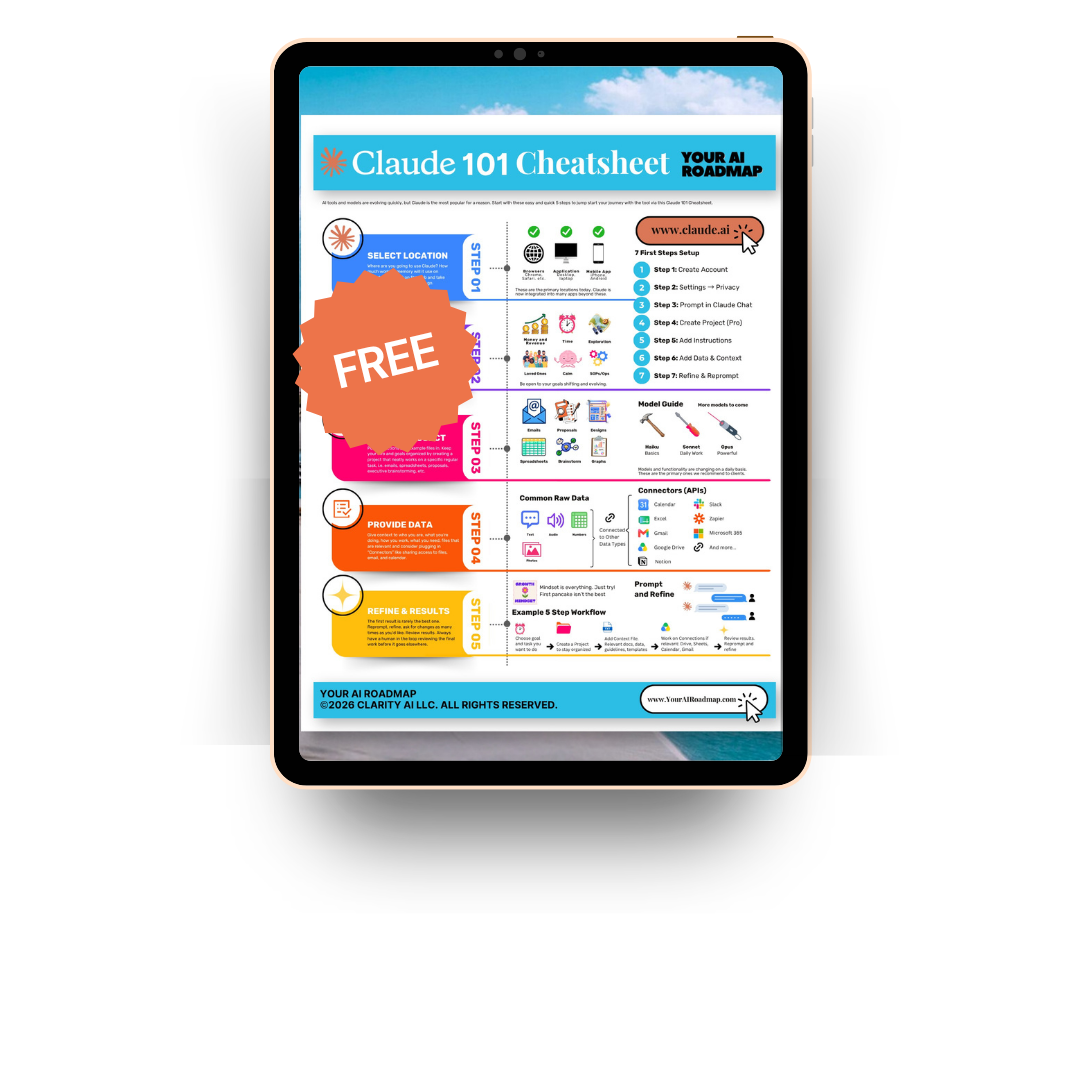
One page. The five-step setup workflow, the seven first steps, the model guide, and the connectors worth turning on first.
Context
- Who you are
- What your company does
- How you make decisions
Workspaces
- Projects
- Files and documents
- Memory
Execution
- Skills
- Connectors
- Delegated tasks
The shift is simple: stop using Claude randomly and start building repeatable systems for the work you already own.
01
Platforms: where executives can use Claude
Claude runs in several places. Availability varies by plan, organization, and region, so confirm what your account and your IT team allow.
| Platform | How executives use it |
|---|---|
| Claude web (browser) | Create Projects, upload board decks and reports, run longer strategy work. |
| Desktop app | Work alongside the files and applications already open on your machine. |
| Mobile app | Prep for a meeting in the car, capture a decision, summarize a call on the way out. |
| Browser extension | Read and act on web content and portals without copy and paste. |
| Excel | Review models, pressure test assumptions, clean commercial data. |
| PowerPoint | Turn findings into a board-ready deck. |
| Word and Outlook | Draft documents and triage the inbox. |
| Claude Cowork | Hand off multi-step work that spans files and tools, with human review at the end. |
Platform
Claude web (browser)
Create Projects, upload board decks and reports, run longer strategy work.
Platform
Desktop app
Work alongside the files and applications already open on your machine.
Platform
Mobile app
Prep for a meeting in the car, capture a decision, summarize a call on the way out.
Platform
Browser extension
Read and act on web content and portals without copy and paste.
Platform
Excel
Review models, pressure test assumptions, clean commercial data.
Platform
PowerPoint
Turn findings into a board-ready deck.
Platform
Word and Outlook
Draft documents and triage the inbox.
Platform
Claude Cowork
Hand off multi-step work that spans files and tools, with human review at the end.
Executive takeaway: pick two. Web for thinking work, mobile for capture. Add the rest once the habit holds. Whichever you choose, think about how much working memory (context) it needs to carry with you across your day.
02
Models: match the model to the decision
Model names change. The decision behind them is stable, and more capable models keep arriving.
| Tier | Use it for |
|---|---|
| Opus tier | Deep reasoning, strategy, long documents, anything where judgment carries risk. |
| Sonnet tier | Daily work, writing, execution, most of your week. |
| Haiku tier | Fast summaries, quick checks, simple formatting. |
Tier
Opus tier
Deep reasoning, strategy, long documents, anything where judgment carries risk.
Tier
Sonnet tier
Daily work, writing, execution, most of your week.
Tier
Haiku tier
Fast summaries, quick checks, simple formatting.
| Executive task | Model tier |
|---|---|
| Review a 60-page diligence pack | Opus tier |
| Stress test a market entry assumption | Opus tier |
| Draft a board update or investor note | Sonnet tier |
| Summarize a leadership meeting | Sonnet or Haiku tier |
| Reformat a list into a table | Haiku tier |
Executive task
Review a 60-page diligence pack
Opus tier
Executive task
Stress test a market entry assumption
Opus tier
Executive task
Draft a board update or investor note
Sonnet tier
Executive task
Summarize a leadership meeting
Sonnet or Haiku tier
Executive task
Reformat a list into a table
Haiku tier
Use deeper reasoning when the decision matters. Use faster models when the task is mechanical. Current model names and availability are listed at support.claude.com.
03
Setup: the seven first steps
A useful setup does not start with clever prompts. It starts with structure, in this order:
- 01Create your account
- 02Open Settings and set your privacy preferences
- 03Prompt in Claude Chat to get a feel for the tool
- 04Create a Project (Pro plan or above)
- 05Add instructions to the Project
- 06Add data and context (your files, docs, and context file)
- 07Refine and reprompt based on what comes back
Goal: one Project for one workflow you run every week. Board reporting, commercial strategy, investor updates, or meeting prep. One is enough to prove the model, and results improve with each round of refining.
04
Projects: your actual workspaces
Projects are workspaces that hold instructions and files across every chat inside them. Instead of restating context each time, you set it once, organized around a specific recurring task.
| Project | How executives use it |
|---|---|
| Board and investor reporting | Draft updates, tighten narrative, pressure test the numbers before the deck goes out. |
| Commercial strategy | Market sizing, competitor reads, pricing scenarios, partner evaluation. |
| Contract and vendor review | Summarize agreements, compare terms, flag what needs legal attention. |
| Meeting prep and follow-up | Agendas, decision lists, recaps, action items with owners. |
| Hiring and org design | Role scorecards, interview questions, leveling, comp research. |
Project
Board and investor reporting
Draft updates, tighten narrative, pressure test the numbers before the deck goes out.
Project
Commercial strategy
Market sizing, competitor reads, pricing scenarios, partner evaluation.
Project
Contract and vendor review
Summarize agreements, compare terms, flag what needs legal attention.
Project
Meeting prep and follow-up
Agendas, decision lists, recaps, action items with owners.
Project
Hiring and org design
Role scorecards, interview questions, leveling, comp research.
05
The context file: the real unlock
A context file tells Claude who you are, what your company does, how you decide, and what good output looks like. One strong context file removes hours of repeated prompting.
Who you are
Role, company, stage
What you do
Products, market, buyers
How you work
Tone, standards, red lines
What you need
Formats, length, next steps
Example context file for a CEO
I am the CEO of a Series B company selling to enterprise buyers in North America and Europe. My audience includes my board, our investors, our customers, and my leadership team. I prefer clear, direct, evidence-based writing with short sentences. Do not invent numbers or citations. Flag assumptions instead of smoothing over them. Separate evidence, interpretation, and recommendation. Never include confidential customer information in any output. When I ask for a document, give me the document, not a description of it.
Paste that into your Project instructions and every chat inside the Project inherits it.
Guides
Claude 101 Cheatsheet for Execs
How CEOs and senior leaders can use more of Claude: platforms, models, setup, Projects, context files, Memory, Skills, Connectors, and the workflows worth building first.
06
Memory: consistency without repetition
Memory lets Claude carry your preferences across conversations: tone, audience, formats, and the standards you keep repeating. Turning it on is part of the seven first steps, right after account creation.
| What Claude can hold | Executive example |
|---|---|
| Tone | Direct, warm, no filler, no hedging. |
| Audience | Board, investors, customers, leadership team. |
| Quality rules | Flag missing evidence rather than guessing. |
| Formats | Tables for options, one page for board material. |
What Claude can hold
Tone
Direct, warm, no filler, no hedging.
What Claude can hold
Audience
Board, investors, customers, leadership team.
What Claude can hold
Quality rules
Flag missing evidence rather than guessing.
What Claude can hold
Formats
Tables for options, one page for board material.
Privacy note: do not store confidential customer information, unreleased financials, or private partner terms unless your organization has approved it in writing. Run this past your legal or security lead before you scale it across a team.
07
Skills: reusable workflows you build once
A Skill packages a repeatable workflow so the output comes back the same way every time. If you do a task more than twice, it belongs here.
| Skill | What it does for an executive |
|---|---|
| Board update | Turns the month's metrics and events into your standard board format. |
| Meeting follow-up | Converts a recorded call into a short recap with owners and dates. |
| Document review | Flags vague claims, unsupported numbers, and weak recommendations. |
| Investor and partner replies | Drafts responses in your voice with a single clear next step. |
| Deck outline | Builds the argument before anyone opens PowerPoint. |
| Role scorecard | Produces a consistent hiring brief for every open position. |
Skill
Board update
Turns the month's metrics and events into your standard board format.
Skill
Meeting follow-up
Converts a recorded call into a short recap with owners and dates.
Skill
Document review
Flags vague claims, unsupported numbers, and weak recommendations.
Skill
Investor and partner replies
Drafts responses in your voice with a single clear next step.
Skill
Deck outline
Builds the argument before anyone opens PowerPoint.
Skill
Role scorecard
Produces a consistent hiring brief for every open position.
08
Connectors: bring Claude into your stack
Connectors let Claude work where the work already lives. Availability depends on your account and your organization's security settings.
Source
Drive, email, calendar, Slack, meeting recorder, and more
Claude Project
Context plus instructions
Output
Briefs, drafts, decisions, action items
| Connector | Executive use case |
|---|---|
| Google Drive | Pull board decks, models, and reports without downloading them. |
| Gmail or Outlook | Summarize threads, surface deadlines, draft replies. |
| Calendar | Prep for the week, brief before each meeting. |
| Slack | Extract decisions and blockers from team channels. |
| Meeting recorders | Turn calls into recaps and follow-ups the same hour. |
| Excel | Review models and commercial data in place. |
| Microsoft 365 | Work across Word, Excel, and Outlook without switching tools. |
| Notion | Pull team docs and wikis into the same brief or update. |
| Zapier | Chain Claude into the automations your team already runs. |
Connector
Google Drive
Pull board decks, models, and reports without downloading them.
Connector
Gmail or Outlook
Summarize threads, surface deadlines, draft replies.
Connector
Calendar
Prep for the week, brief before each meeting.
Connector
Slack
Extract decisions and blockers from team channels.
Connector
Meeting recorders
Turn calls into recaps and follow-ups the same hour.
Connector
Excel
Review models and commercial data in place.
Connector
Microsoft 365
Work across Word, Excel, and Outlook without switching tools.
Connector
Notion
Pull team docs and wikis into the same brief or update.
Connector
Zapier
Chain Claude into the automations your team already runs.
Security first: connectors touch company data. Involve IT and security before connecting anything holding confidential information.
09
Delegation: use it, with guardrails
Cowork and delegated tasks let you hand off multi-step work. That capability is useful and it needs limits.
Executive rule: delegate repeatable work, never professional accountability. Claude can draft, summarize, organize, and check. Financial, legal, and ethical judgment stays with your people. Always keep a human in the loop reviewing final work before it goes anywhere else.
| Repeatable task | Safe delegation example |
|---|---|
| Weekly leadership summary | Summarize updates and flag what slipped. |
| Meeting preparation | Build the agenda and list the decisions needed. |
| Document review | Flag unsupported claims before legal sees the draft. |
| Partner follow-up | Draft the reminder for a human to approve and send. |
Repeatable task
Weekly leadership summary
Summarize updates and flag what slipped.
Repeatable task
Meeting preparation
Build the agenda and list the decisions needed.
Repeatable task
Document review
Flag unsupported claims before legal sees the draft.
Repeatable task
Partner follow-up
Draft the reminder for a human to approve and send.
10
Prompting: specific task, context, constraints, example
Good prompting is not about magic words. It is about working conditions.
Specific task
Review this section
Context
This goes to my board
Role and constraints
Act as a skeptical director. Invent nothing.
Example
Match this structure and tone
Template you can copy
Act as a skeptical board director reviewing this update before the meeting. I am the CEO of a Series B company. Review the section below for clarity, evidence strength, logic, and usefulness to a decision-maker. Do not invent evidence. Separate findings, interpretation, and recommendation. Flag every unsupported claim. Return a table with three columns: issue, why it matters, suggested revision.
11
A practical setup for board reporting
| Setup element | What to add |
|---|---|
| Project name | Board and investor reporting |
| Project instruction | Prioritize clarity, evidence, and usefulness to a decision-maker. Flag gaps rather than filling them. |
| Context file | Role, company, audience, tone, red lines, and formats. |
| Files | Last four board decks, the current model, your metric definitions, the investor update template. |
| Connectors | Google Drive for the decks, Calendar for meeting prep. |
| Skills | Board update draft, metric commentary, risk section review. |
Setup element
Project name
Board and investor reporting
Setup element
Project instruction
Prioritize clarity, evidence, and usefulness to a decision-maker. Flag gaps rather than filling them.
Setup element
Context file
Role, company, audience, tone, red lines, and formats.
Setup element
Files
Last four board decks, the current model, your metric definitions, the investor update template.
Setup element
Connectors
Google Drive for the decks, Calendar for meeting prep.
Setup element
Skills
Board update draft, metric commentary, risk section review.
Build this one and you will save a day per quarter, minimum.
12
Your first week with Claude
The cheat sheet's five-step workflow, applied to your calendar:
- 01Choose the goal and task you want Claude to own this week.
- 02Create a Project to keep it organized.
- 03Add a context file covering your role, audience, tone, and quality rules, plus five documents that define how your company writes and decides.
- 04Work on connections if relevant: Drive, Sheets, Calendar, Gmail, or another connector your security team has approved.
- 05Review results, reprompt, and refine. The first draft is rarely the best one. Ask for changes as many times as you need to.
13
Related resources from Clarity AI
AI Readiness Blueprint
A 90-minute session with your C-suite. You leave with an executive 1-pager and three projects, prioritized and priced.
15-minute AI fit call
Bring one problem. Find out whether AI is the answer.
Clarity AI services
How we scope, price, and build AI projects with leadership teams.
Claude support and current feature availability
Plans, limits, and features change. Check here before you commit a workflow.
FAQ
Frequently Asked Questions
Ready? Claude 101 Cheetsheet
Claude gets useful when executives stop treating it as a one-question chat tool and start treating it as a structured work system. Choose the platform, choose the model tier, work through the seven first steps, create one Project, write one context file, build a few reusable Skills, connect one tool, and prompt with context and constraints.
The goal is not to use every feature. The goal is a system that gives you back the hours you currently spend drafting.
Dr. Joan Palmiter Bajorek is CEO of Clarity AI, where she works with executive teams on AI strategy and implementation. Connect on LinkedIn.